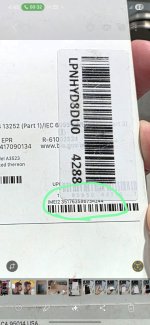
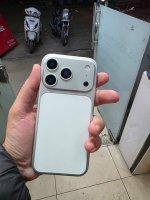
Clicktech send me the dummy phone insted to Iphone 17 pro max.

AnkitGoel

New member
Seller Name
Clicktech
Company Name
Amazon
Product Name
Iphone 17 Pro Max 256gb silver color
Website Name
Amazon.in
Loss Amount
1340000
Ratings
1.00 star(s)
Opposite Party Address
AMAZON SELLER SERVICES PRIVATE LIMITED
#26/1, BRIGADE GATEWAY, 8TH FLOOR.,
DR RAJKUMAR ROAD, MALLESHWARAM WEST
BANGALORE, KARNATAKA – 560055
On 12 December 2025, I ordered Iphone 17 Pro Max 256gb silver color from Amazon and the seller was clicktech, received the packet on 17th December 2025, but to the utter shocked, when we open the packet we found a plastic peice insted of Iphone.

I emailed the amazon and also called them but they denied to change it and not accepting their mistake.

I want to file a case against them, please guide me the process, and i can opt the legal service and pay the legal fee.

Thanks
 

Attachments

  • WhatsApp Image 2026-01-22 at 1.56.17 PM.jpeg
    WhatsApp Image 2026-01-22 at 1.56.17 PM.jpeg
    148.4 KB · Views: 0
  • WhatsApp Image 2026-01-31 at 4.46.52 PM.jpeg
    WhatsApp Image 2026-01-31 at 4.46.52 PM.jpeg
    106.9 KB · Views: 0
Hello @AnkitGoel

Please download the document and follow steps.

Step: 1 - Enter Password to open (Check WhatsApp).
Step: 2 -Take Printout of all documents.
Step: 3 -Notarize the Affidavit and the Event file.
Step: 4 -Sign all the documents. (View Video for Reference)


Step: 5 -Scan all the documents.
Step: 6 -Create an account on E-Jagriti portal.
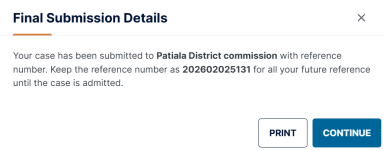
Step: 7 -Submit new case.
Step: 8 -Upload the documents on E-Jagriti portal.
Step: 9 -Pay the court/processing fee.

If any question feel free to contact again.

For latest update
Download our App:

For Android Mobile:

For IOS Mobile :

If you like my reply, please share this to help other consumers.

Thanks.
 

Attachments

Hello @AnkitGoel

Step : 1 - Take Print
Please make 6 sets of the files uploaded on the e-jagriti (Proper Staple Each Set).
  1. Index
  2. Memo of Parties
  3. Events
  4. Affidavit
  5. Proforma
  6. Supporting Document
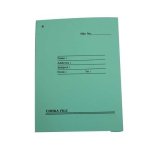
Step : 2 - Buy 2 Files Covers
Buy 2 (Two) simple Office Files.
NOTE: Don't use thread to tag pages

tag_File_700.jpg

Step : 3 - Take Print
Take Two prints of attached File (Sticker.pdf) and paste it on the file cover.

Step : 4 - Arrange Documents
First File:
Arrange 5 sets of files

Second File: Arrange 1 set of file

Step : 5 - Visit Consumer Commission

Step : 6 - Submit File
Show the first file to the office staff, they will submit it and approve the case manually and provide you the next date.

The second file is for your reference.

If still have a question, feel free to call us.
Thanks
 

Attachments

Back
Top